Checking into the Village
I’m joining the #prisoner106 version of DS106 this summer. It’s based on “The Prisoner,” a show I didn’t even know about until now.
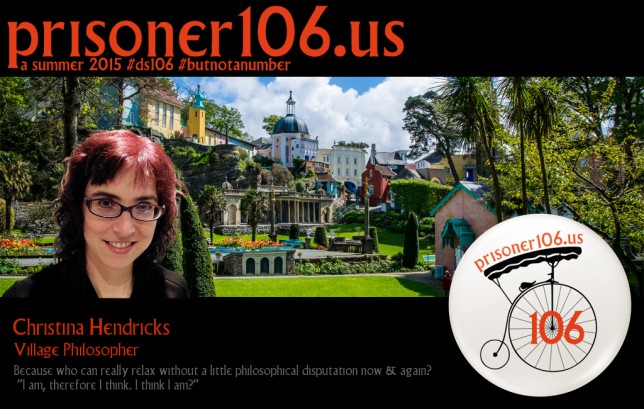
I’m checking into the Village with my official Village information card.
the process
The office in the Village gave us a layered .psd file to start with. Then we just had to add our picture, change the text, and voilà, right? After I downloaded the “Village” font from dafont.com I thought it would be easy peasy. Not quite.
On GIMP, which is what I use for image editing, you can’t edit text layers unless they are “text layers” in GIMP. Which is apparently a thing. The layers in the .psd file (is this Photoshop?) are not GIMP “text layers.” I found that out after rather longer trying than I should have tried, and rather a bit of web searching.
But of course, the next best thing is to just delete the text layers on the original and start over. I tried to find a red colour for my name and Village role that at least sort of matched the colour at the top. And then, indeed, voilà!
For the image, I had to cut myself out from some other background, which I did using the “lasso” or “free select” tool, being kind of lazy about going around all that hair. Then I did control-C to copy the selected area, and pasted it to a new layer (I can’t remember now how I manged to do that part, the pasting part; and I just did it a few minutes ago. Sigh.). Then I used the eraser tool to erase around some of the hair so it blended into the background a bit more.
And now I am ready for a couple of months of rest and relaxation, and getting to know the friendly Rover!